Cookbook · 20 min · Oct 21, 2026
Track competitor ads in the Meta Ad Library with Claude Code and Sai
The Meta Ad Library shows every active ad on Facebook and Instagram, but there is no API for the creative itself, so competitor research usually means scrolling and copying by hand. This cookbook follows a real run where Claude Code handed the job to Sai, the computer use agent on Simular Platform, and got back the ads for Nike, Adidas and New Balance, cleaned and scored.
TL;DR: the result
One prompt in Claude Code sent Sai to the Meta Ad Library on its own Windows cloud computer. It searched three brands in turn and returned the active ads it found. Two follow-up prompts cleaned the rows and scored them. In the run this cookbook is based on:
- 14 ads came back across Nike, Adidas and New Balance.
- 8 of the 14 were retailers pushing a whole assortment, not a single product.
- None had a discount, and 5 mentioned free shipping.
- Most New Balance results were one Amazon template, repeated.
- Sai caught 2 wrong entries by itself and dropped them before it sent the list.
- The run used 233 credits and about 15 minutes of computer time. Your laptop was free the whole time.
Check the full video: https://x.com/Med1_Ai/status/2112915396567458191
What is competitor ad research with a computer use agent?
The Meta Ad Library is a public search page for the ads running across Meta's apps. You can search it by keyword and country, but you can only read the ads on screen. There is no export for the copy, offer or call to action.
A computer use agent reads the page the way you would. Sai, the agent in Simular Platform, opens Chrome on a cloud computer, runs each search, reads the ad cards and returns the fields you asked for. Your coding agent sends the task over MCP, waits, and turns Sai's answer into files in your project.
Why use Simular Platform instead of a scraper?
What you need before you start
- A Simular Platform account and API key. Sign in at platform.simular.ai with Google. Free accounts verify a phone number before their first key. Keys start with
sapi_and are shown once. - Claude Code with the Sai MCP server. Codex and Cursor work the same way.
- Node.js 22.12 or newer for the Sai MCP server, which runs through
npx. - An empty project folder, such as
sai-ads, where Claude Code can write the CSV and JSON.
Add Sai to Claude Code
Setup is one command. Replace sapi_YOUR_KEY with your key, and add -s user to make Sai available in every project.
claude mcp add sai -s user -e SAI_API_KEY=sapi_YOUR_KEY -- npx -y @simular-ai/sai-mcp

# Optional: install the Sai skill, which teaches Claude Code the task loop
npx -y @simular-ai/sai-mcp init-claude
Start a new Claude Code session in your project folder so the sai_* tools load, then run claude mcp list to check that sai is connected. More in Claude Code.
Prefer to let your coding agent do the setup? Copy agent prompt on the Simular Platform home page puts the full setup instructions on your clipboard, and the menu next to it opens Claude Code, Codex or Cursor with them typed in.
Write the collection prompt
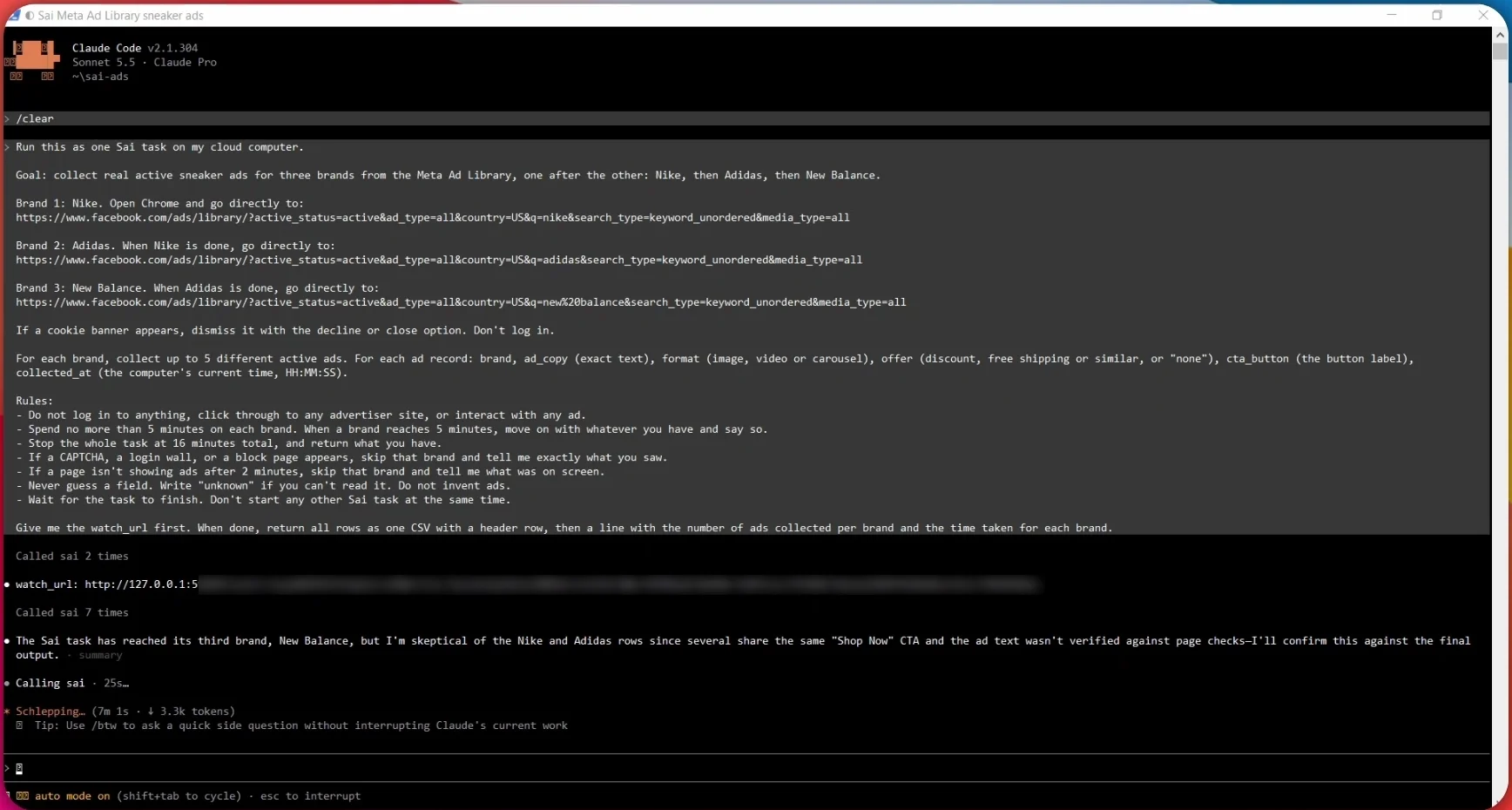
The prompt does most of the work. It names the exact search URL for each brand, the fields to record, and what to do when the page doesn't cooperate. This is the prompt from the run:
Run this as one Sai task on my cloud computer.

Goal: collect real active sneaker ads for three brands from the Meta Ad Library,
one after the other: Nike, then Adidas, then New Balance.

Brand 1: Nike. Open Chrome and go directly to:
https://www.facebook.com/ads/library/?active_status=active&ad_type=all&country=US&q=nike&search_type=keyword_unordered&media_type=all

Brand 2: Adidas. When Nike is done, go directly to:
https://www.facebook.com/ads/library/?active_status=active&ad_type=all&country=US&q=adidas&search_type=keyword_unordered&media_type=all

Brand 3: New Balance. When Adidas is done, go directly to:
https://www.facebook.com/ads/library/?active_status=active&ad_type=all&country=US&q=new%20balance&search_type=keyword_unordered&media_type=all

If a cookie banner appears, dismiss it with the decline or close option. Don't log in.

For each brand, collect up to 5 different active ads. For each ad record: brand,
ad_copy (exact text), format (image, video or carousel), offer (discount, free
shipping or similar, or "none"), cta_button (the button label), collected_at
(the computer's current time, HH:MM:SS).

Rules:
- Do not log in to anything, click through to any advertiser site, or interact
  with any ad.
- Spend no more than 5 minutes on each brand. When a brand reaches 5 minutes,
  move on with whatever you have and say so.
- Stop the whole task at 16 minutes total, and return what you have.
- If a CAPTCHA, a login wall, or a block page appears, skip that brand and tell
  me exactly what you saw.
- If a page isn't showing ads after 2 minutes, skip that brand and tell me what
  was on screen.
- Never guess a field. Write "unknown" if you can't read it. Do not invent ads.
- Wait for the task to finish. Don't start any other Sai task at the same time.

Give me the watch_url first. When done, return all rows as one CSV with a header
row, then a line with the number of ads collected per brand and the time taken
for each brand.
Three choices in it matter most:
- Direct URLs. Going straight to each search result skips the search box and the country picker, which is where a run usually loses time.
- Time limits per brand and in total. A page that never loads costs you five minutes, not the whole run.
- "Never guess a field." Sai reads what is on screen. When a value isn't there,
unknownis an answer you can filter; an invented value is not.
Run it and watch the cloud computer
Paste the prompt into Claude Code. It starts the task with sai_task_start, posts the watch_url and waits with sai_task_wait, sharing progress as it goes. Open the watch_url to see Chrome on the cloud computer as Sai moves through the three searches.
Approve the page scan
To read the ad cards, Sai asks to run a script in the browser. The request arrives as an approval: Browser JS Execution: Sai will scan the current page to find sponsored advertisements and extract the names of the advertisers along with the text content of these ads. You can choose Approve, Approve rest of task or Deny.
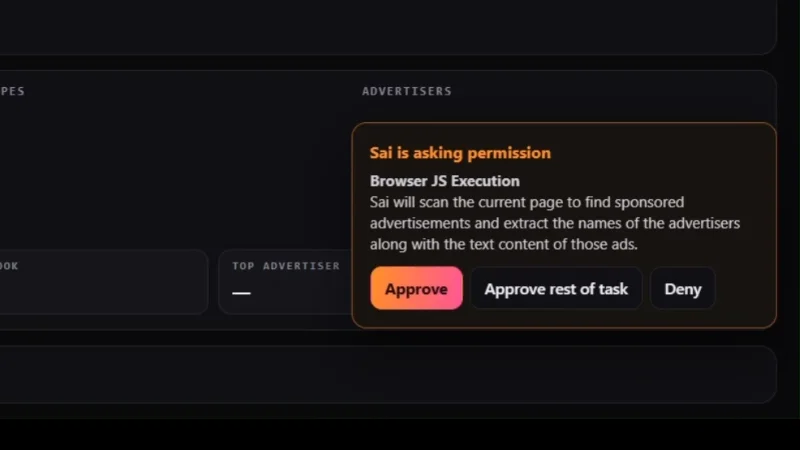
The script only reads text from the page, so approving it fits the task. Approve rest of task saves you from answering the same request for each brand. See Approvals.
When one brand comes back thin
Expect one brand to need a second pass. In the run, Claude Code sent New Balance again as its own task. That task finished in 3 minutes 39 seconds with 4 relevant ads, all from Amazon Fashion. Sai dropped the cards that didn't match, such as a blood pressure ad that mentioned New Balance only in passing, and said so in its report.
Clean the rows into one CSV
Sai returns what it read. Turning several task results into one dataset is a job for Claude Code, in your folder. The follow-up prompt from the run, shortened:
Create ads.csv in this folder by combining all the ad rows Sai returned in this
session: the Nike, Adidas and New Balance rows from the first task, and the
New Balance rows from the second task. Then clean it:
1. Remove duplicate ads. Keep each one once, under the first brand it appeared.
2. Rename the first column search_term, since these are ads that mention a
   brand, not ads by the brand itself.
3. Add an advertiser column. Fill it where the ad copy or Sai's output names
   the advertiser. Otherwise write "unknown".
4. Set format and cta_button to "unverified" unless Sai's output shows them.
5. Set offer from the ad copy text only. Write "free shipping" only if the copy
   literally says it, otherwise "none".
6. Keep every ad_copy as returned. Where it was cut off mid-word by the card,
   add a note "copy truncated".
When done, print the unique ad count per search_term, the count per advertiser,
and a list of everything you changed.
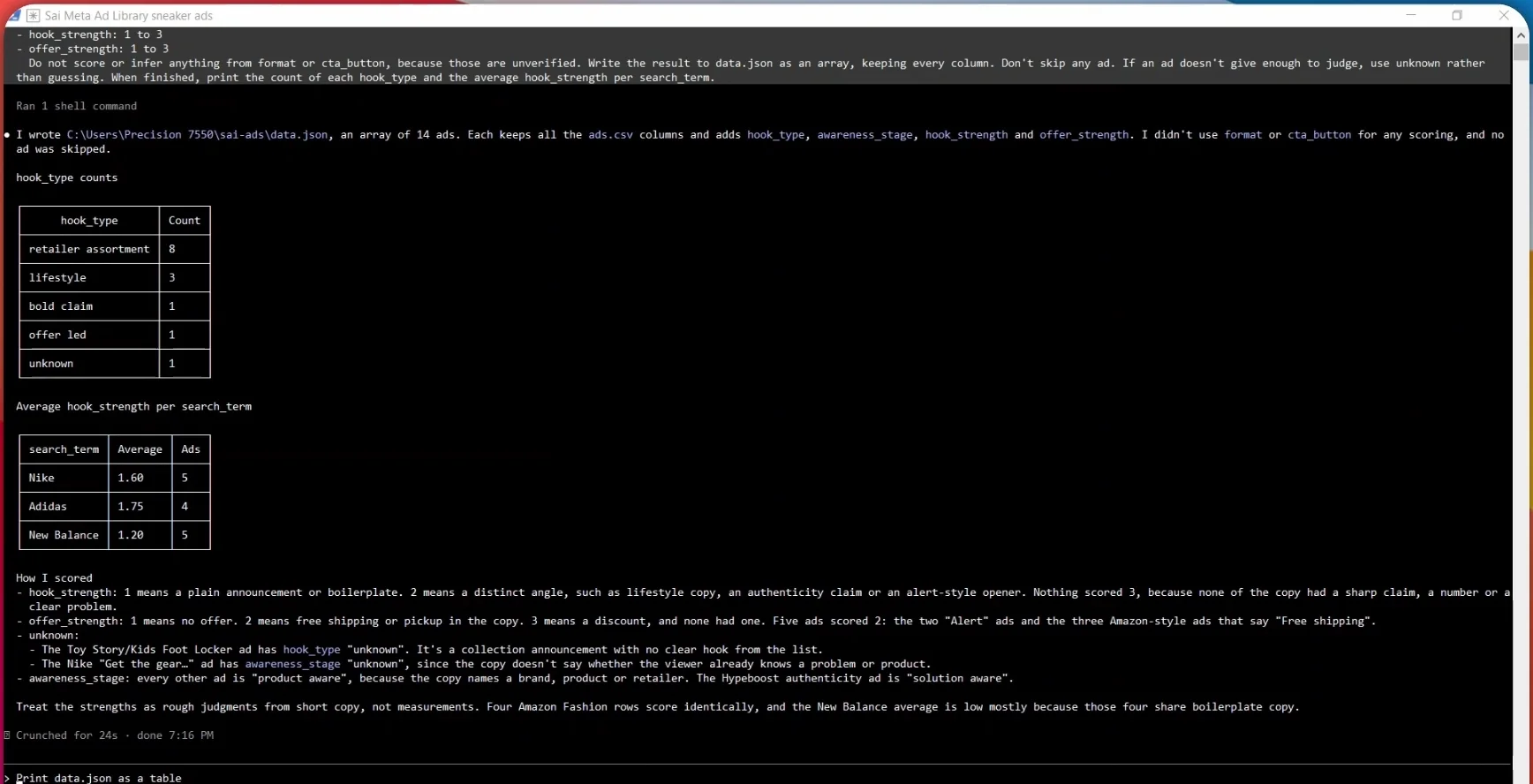
In the run, this removed one ad that appeared under both Nike and Adidas and left 14 unique ads: 5 for Nike, 4 for Adidas and 5 for New Balance. Amazon Fashion was the largest advertiser with 4 ads.
Two of the rules above keep the data honest. search_term instead of brand: a search for "nike" returns retailer ads that mention Nike, not only Nike's own ads, so the column says what was searched. unverified: Sai's report didn't include the page evidence for format and button labels on every row, so Claude Code marked them instead of copying a guess.
Score the hooks and offers
With clean rows, Claude Code can classify each ad. Ask for a fixed set of labels and small scales, so the results add up:
Read ads.csv and write data.json as an array, keeping every column and every ad.
Add four fields to each ad:
- hook_type: retailer assortment, lifestyle, bold claim, offer led or unknown
- awareness_stage: problem aware, solution aware, product aware or unknown
- hook_strength: 1 to 3
- offer_strength: 1 to 3 (1 no offer, 2 free shipping or pickup, 3 a discount)
Score from the ad copy only. Do not score or infer anything from format or
cta_button, because those are unverified. If an ad doesn't give enough to
judge, use unknown rather than guessing. When finished, print the count of each
hook_type and the average hook_strength per search_term.No ad scored 3 on the offer scale, because none had a discount. Five scored 2 for free shipping. New Balance's low average comes from four Amazon Fashion rows that share the same boilerplate copy. Treat these as quick judgments from short copy, not measurements.
Add a live dashboard (optional)
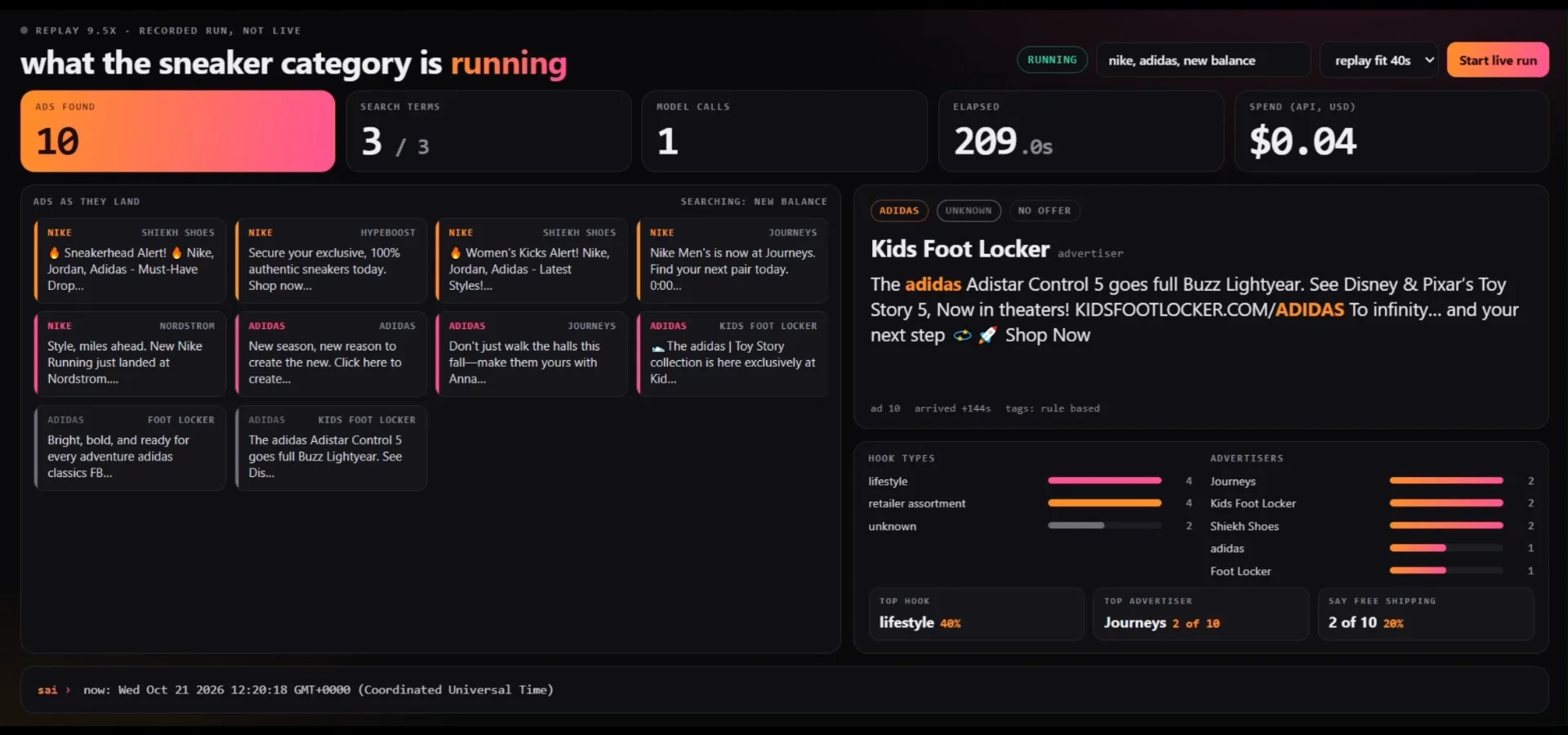
The dashboard in the video is a small local web page that reads the same rows and fills in as ads arrive: a feed of ad cards, counts per hook type and advertiser, the top hook, how many ads say free shipping, and the elapsed time and API spend. Ask Claude Code to build one from data.json once the pipeline works. Keep your SAI_API_KEY on the server side of any page you build; the browser should never call the Sai API directly.
Make it your own research loop
- Change the category. Swap the three search URLs for your competitors or your own brand. Keep
active_status=activeand setcountryto the market you care about. - Collect more ads. Raise "up to 5" and the per-brand time limit together. Larger runs use more credits and computer time.
- Run it on a schedule. The same prompt every week gives you a record of how a category's messaging shifts. Compare each week's
data.jsonwith the last. - Make repeat runs cheaper. Once the collection works, ask Sai in the same conversation to save it as a replayable skill, with the brand as a parameter. Replays consult the model only where the screen matters, which cuts cost by up to 90% on repetitive tasks.
- Keep the rules. The limits, the no-login rule and "never guess a field" are what make the output usable. Carry them into every variant.
Troubleshooting
Watch the run
See the run, from the prompt to the scored table, in the run video on X. For every endpoint and event type, see the Sai API docs.
Frequently asked questions
Can I export ads from the Meta Ad Library?
The Ad Library shows ads on screen, and its search can't export the ad copy, offer or call to action. A computer use agent such as Sai reads the rendered page and returns those fields as rows you can save to a CSV.
Does Sai log in to Facebook to collect the ads?
No. The Ad Library's search results are public, and the prompt tells Sai not to log in, not to click through to advertisers and not to interact with any ad. If a login wall appears, Sai skips that brand and reports what it saw.
How long does a run take, and what does it cost?
The run in this cookbook covered three brands and used about 15 minutes of computer time and 233 credits. The prompt caps each brand at 5 minutes and the whole task at 16 minutes, so a run can't run on indefinitely.
Why does the CSV say search_term instead of brand?
A keyword search for a brand returns every ad that mentions it, including retailers such as Foot Locker or Amazon. Calling the column search_term keeps that clear when you read the results later.
How do I stop the agent from making up data?
Tell it so in the prompt: never guess a field, write "unknown" when something can't be read, and don't invent ads. In the run, Sai dropped 2 wrong entries by itself, and Claude Code marked unverified fields instead of filling them.
Does the research run on my own computer?
No. Sai works on its own cloud computer, so your laptop and your browser stay free. You can watch the run live from the watch_url.
Can I use Codex or Cursor instead of Claude Code?
Yes. Add @simular-ai/sai-mcp with your SAI_API_KEY to any client that runs stdio MCP servers, and use the same prompts. See Codex for its tool timeout setting.
Build yours
The free plan includes a cloud computer. Get a key and follow the steps above, or start from the quick start.